
Help clear the way this Vision Awareness Month
This October, Guide Dogs Queensland is teaming up with Snap Send Solve for Vision Awareness Month to help make our streets, footpaths and shared spaces safer and more accessible for people with low vision or blindness.
Something as simple as an overgrown hedge, a damaged footpath or an e-scooter left across a walkway can create a significant obstacle for someone navigating their community.
Throughout October, we’re encouraging Queenslanders to keep an eye out for accessibility hazards in their local area and use the free Snap Send Solve app to report them.
What is Snap Send Solve?
Snap Send Solve is a free app that makes it easy to report issues in your community to the council, authority or organisation responsible for addressing them.
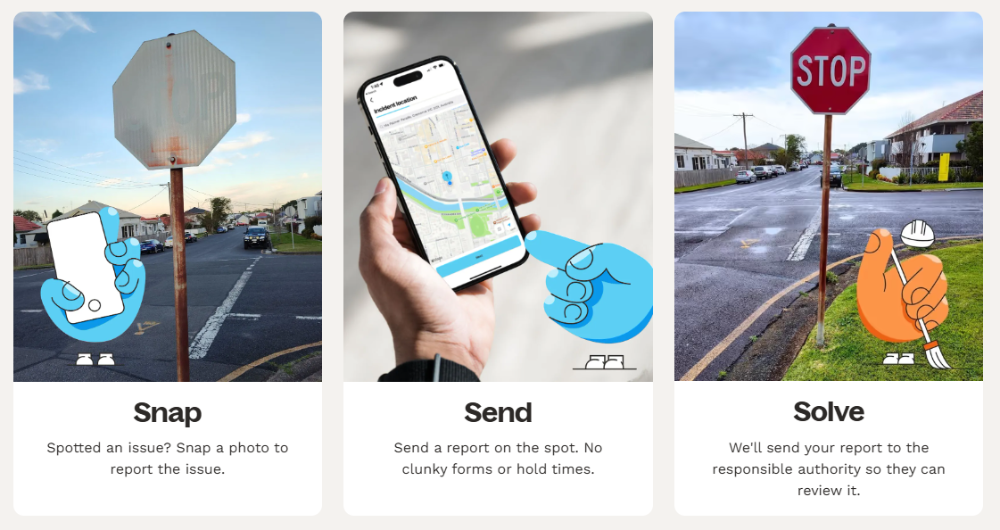
Using your phone, you can take a photo of an issue, confirm its location, add a few details and send your report through the app.
Snap Send Solve helps identify the appropriate organisation to receive the report, taking some of the guesswork out of figuring out who to contact.
What should I look out for?
This Vision Awareness Month, we’re asking the community to pay particular attention to obstacles that can make getting around more difficult for people with low vision or blindness.
These could include:
- Overgrown vegetation such as hedges, shrubs or low-hanging branches extending across a footpath.
- Damaged or uneven footpaths including cracks, raised sections, holes or other trip hazards.
- E-scooters and e-bikes blocking pathways, particularly when they have been left across a footpath or access point.
- Damaged street lighting, including lights that are broken, flickering or not operating properly.
- Obstructions on footpaths such as dumped items, fallen signage or other objects reducing the available space.
- Accessibility infrastructure that needs attention, such as damaged kerb ramps or pedestrian facilities.
For someone travelling with a Guide Dog, using a white cane or relying on their remaining vision, these obstacles can make an otherwise familiar journey more difficult to navigate safely and independently.
See it? Snap it. Send it.
Reporting an issue only takes a few steps.
- Snap
Open the Snap Send Solve app and take a clear photo of the issue, or select an existing photo from your phone. - Confirm the location
The app can use the location attached to your photo, or you can enter the location manually. - Add the details
Choose the type of issue and include a short description to help explain the problem. - Send
Review your report and select Send Snap. The report can then be directed to the relevant organisation.
For the best results, report one issue at a time. If possible, include a close-up photo of the problem as well as a wider photo showing its location and surroundings.
Learn more about how to use Snap Send Solve
Help us clear the way this October
Accessible communities benefit everyone.
Whether you’re walking the dog, heading to the shops or simply out in your neighbourhood, take a moment to notice what’s happening along the footpath.
If you spot something that could create a barrier for someone with low vision or blindness, Snap it, Send it and help get it Solved.
Download Snap Send Solve and get snapping this Vision Awareness Month.